
AXS Audit
Accessibility intelligence for compliance, clarity and real-world usability.
AXS Audit scans your website for WCAG issues, cognitive barriers and usability friction, helping your team understand what needs fixing, why it matters and how to improve.
At its core is a dedicated cognitive accessibility layer, created by specialists in neurodiversity, disability and inclusive design. It assesses barriers most scanners overlook, including clarity, comprehension, cognitive load and distraction, giving organisations a deeper way to evidence accessibility and improve the digital experience.
Because a website can pass many automated checks and still be hard to read, navigate or understand.
Start with a free accessibility scan
Enter your website domain and we’ll scan 10 of your site’s most popular pages, checking for technical accessibility issues, cognitive accessibility signals and the barriers most worth investigating.
What your free scan includes
Your free scan gives you a focused snapshot of your website’s accessibility, cognitive barriers and usability friction. It checks key pages for common WCAG issues, clarity problems, cognitive load, distraction and user experience barriers, then highlights the findings most worth investigating.
It is not a full-site audit or compliance guarantee. It is a practical first step, helping you understand where barriers may exist and whether a deeper AXS Audit would be valuable.
WCAG checks
Common accessibility issues linked to structure, labels, contrast, navigation and content.

Cognitive accessibility preview
A first look at clarity, comprehension, cognitive load and distraction.
Priority findings
The issues most likely to affect users and deserve closer investigation.
Plain-language report
Clear explanations for digital, inclusion, marketing and leadership teams.
Sample remediation guidance
Practical examples of how issues may be improved.
Upgrade to full audit
Wider page coverage, scan credits, deeper reporting and ongoing monitoring.
Beyond code-level checks
Technical failures matter, but they are only one part of accessibility.
Cognitive barriers
Dense language, unclear instructions and distraction can make content harder to process.
Real user context
AXS Audit looks at how pages feel when people read, navigate and complete tasks.
A fuller picture
Combine WCAG checks with cognitive accessibility insight for clearer priorities.
Why standard scanners miss the full picture
Most scanners are built to find technical accessibility failures. Those checks are important, but they do not always show whether a page is clear, understandable or easy to move through.
A website can pass many automated checks and still be difficult to read, navigate or understand.
AXS Audit combines WCAG testing with cognitive accessibility insight, helping teams identify barriers around clarity, comprehension, cognitive load, distraction and user journeys. The result is a more human view of accessibility: not just whether a page passes a rule, but whether people can use it with less friction.
Cognitive accessibility, measured with purpose
AXS Audit adds a dedicated cognitive layer to accessibility testing, helping teams understand how clear, manageable and usable their content feels for real people.
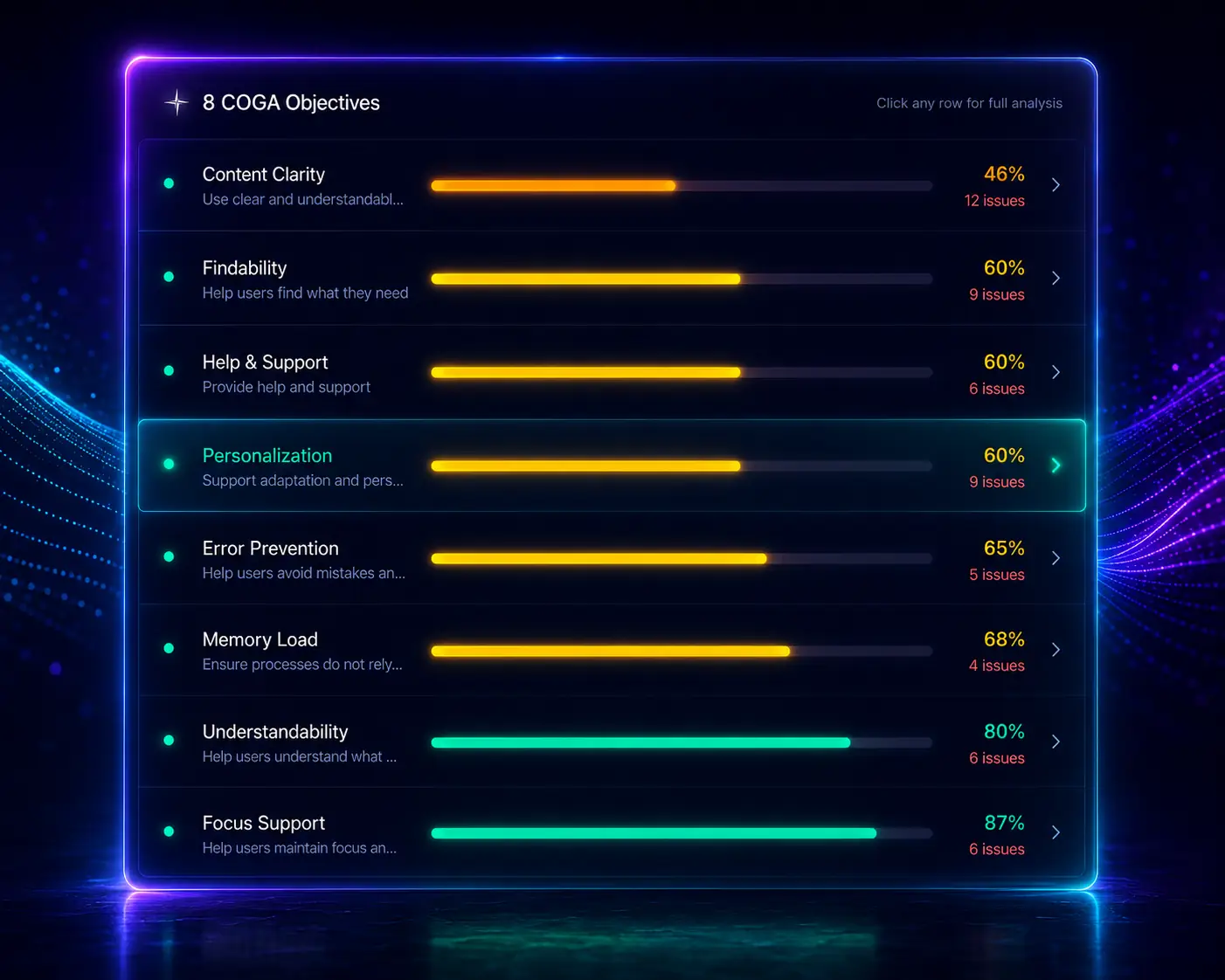
The Cognitive Accessibility Score (CAS) looks at clarity, comprehension, navigation, support and user control. The Cognitive Load Index (CLI) looks at the friction users may experience when trying to process content or complete a task.
Together, they reveal barriers that standard technical scans often miss, from dense language and unexplained acronyms to distracting movement, overloaded layouts and unclear journeys.
Cognitive Accessibility Score
Shows how well a page supports understanding, navigation and user control.
Cognitive Load Index
Highlights the effort required to process content and complete tasks.
Human impact
Maps issues to the users most likely to be affected.
Clear priorities
Helps teams focus on changes that improve usability, not just compliance.
It sees the page your users see
Most accessibility scanners inspect the static code behind a page. That is useful, but it can miss the barriers that only appear when a website is fully loaded, visually rendered and interacted with.
AXS Audit adds a more advanced layer: it captures the rendered page, applies AI Vision to assess the visual experience and uses browser simulation to test how people move through interactive content. This helps surface issues standard scanners often overlook, from confusing layouts and poor visual hierarchy to keyboard navigation problems, dynamic content failures and alt text that exists but does not meaningfully describe the image.
Render
Loads pages after scripts, layouts and dynamic content appear.
See
Uses AI Vision to assess visual hierarchy, image meaning and contextual barriers.
Interact
Simulates keyboard movement, focus order and user journeys.
Explain
Turns technical and visual findings into clear remediation guidance.
From findings to fixes
AXS Audit is built to help teams act, not just observe. Each finding is explained in clear language, connected to the relevant accessibility requirement and prioritised by likely user impact.
Repeated issues can be grouped across pages, helping teams fix the underlying pattern rather than chase the same problem one page at a time. Where deeper support is needed, Orion can help interpret findings in context, explaining what the issue means and how a team might approach remediation.
Find
Identify technical, cognitive and usability barriers.
Understand
See why each issue matters and who it may affect.

Ask Orion
Get contextual support on selected findings.
Fix
Use remediation guidance to support implementation.
Rescan
Check progress after changes and continue improving.
A report built for action, not just evidence
AXS Audit brings technical accessibility, cognitive accessibility, visual analysis and remediation guidance into one structured report. It helps your team understand the state of your website, the barriers users may face and the actions most worth taking next.
The report is designed to go deeper than a standard issue list. It can separate findings by WCAG level, highlight cognitive accessibility and cognitive load concerns, review image descriptions and text embedded in images, identify visual and interaction barriers and group repeated issues across pages so teams can fix patterns, not just symptoms.
At the centre of the report are AXS Audit’s most distinctive measures: the Cognitive Accessibility Score and Cognitive Load Index. These help reveal whether content is clear, manageable and usable for real people, including neurodivergent users, disabled people, assistive technology users and anyone trying to process complex information under pressure.
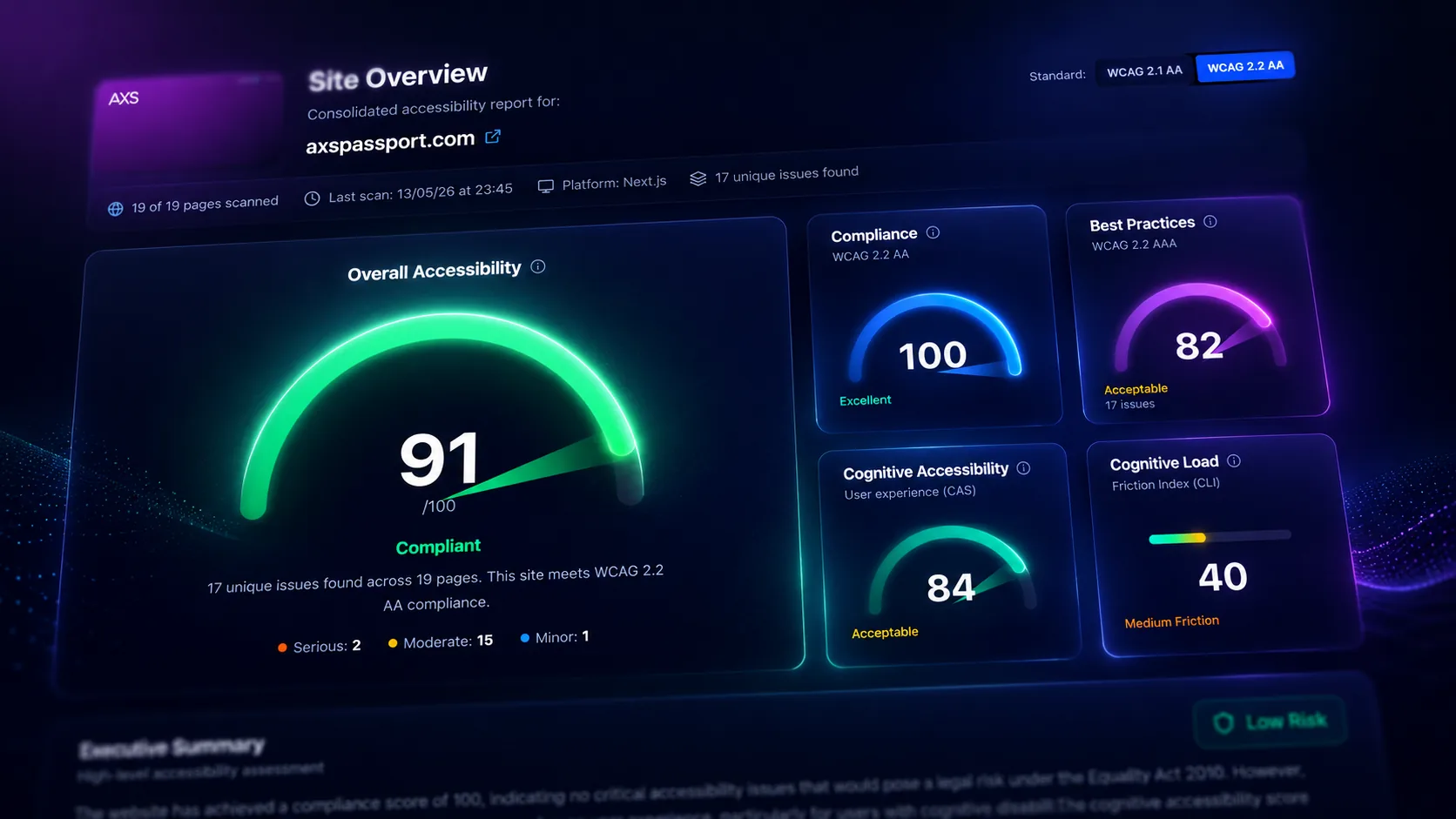
Compliance and site overview
See where your website stands before going into the detail.
The report opens with a clear overview of your website’s accessibility position, including overall score, WCAG status, pages scanned, unique issues, severity breakdown and scan history.
Findings can be organised by conformance level, including A, AA and AAA, so teams can separate essential compliance priorities from higher-standard best practice improvements.
What this shows
- Overall accessibility score
- WCAG status
- Pages scanned
- Unique issues found
- Severity breakdown
- Scan history
- Issue tabs for A, AA and AAA
- Resolved and unresolved findings
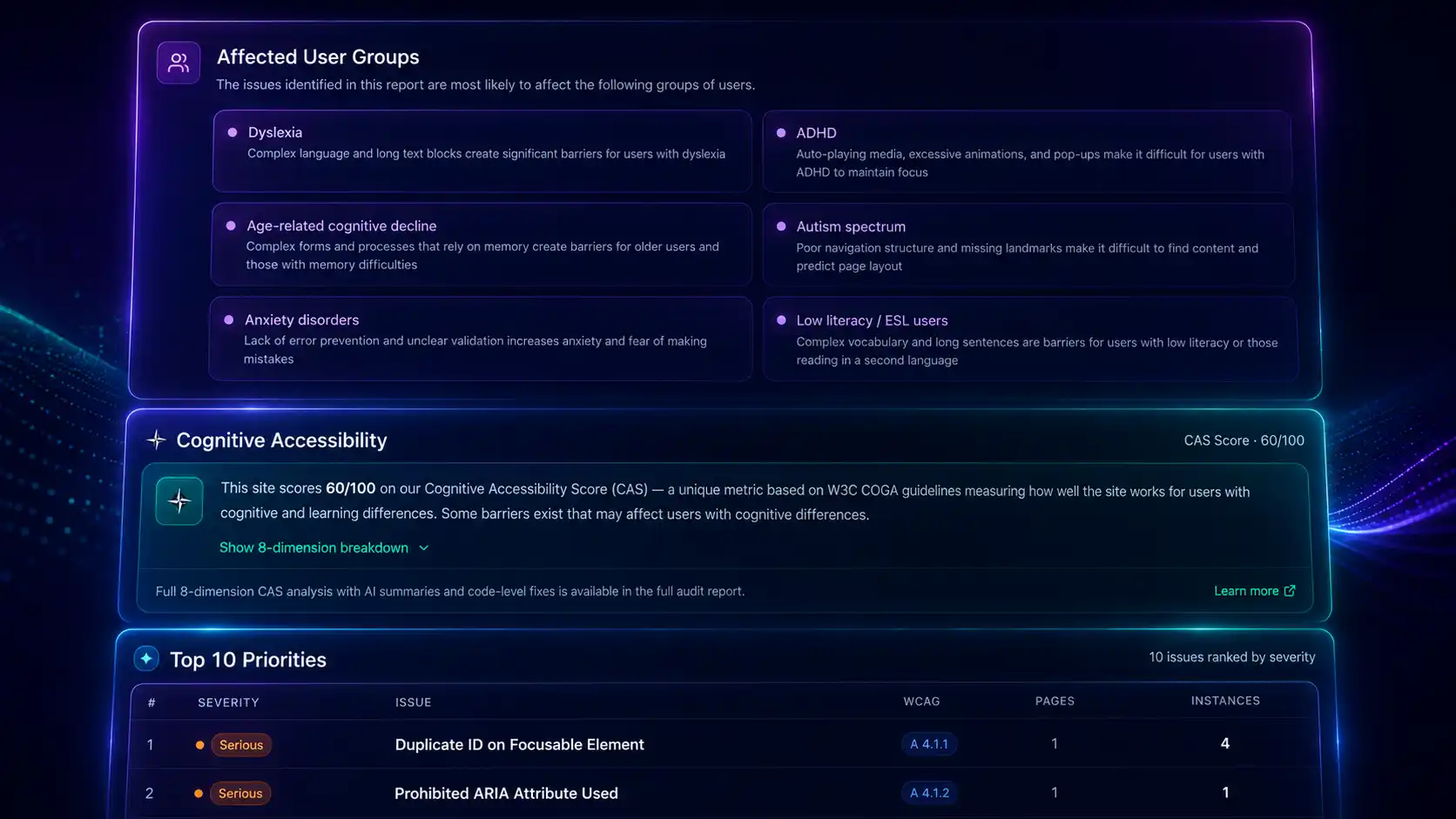
Cognitive accessibility intelligence
Measure the barriers most scanners do not see.
AXS Audit includes a dedicated cognitive accessibility layer, designed to assess how clear, understandable and manageable a website feels for people with cognitive, learning and neurodivergent access needs.
The Cognitive Accessibility Score looks at areas such as clarity, comprehension, navigation, support, personalisation, distraction and audience impact. It helps teams understand where a page may be technically functional but still difficult to use.
The Cognitive Load Index highlights where users may need to work harder than necessary to read content, understand information or complete a task.
What this shows
- Cognitive Accessibility Score
- Cognitive Load Index
- Content clarity
- Reading complexity
- Dense content
- Unexplained acronyms
- Distraction risks
- Animation and movement concerns
- Audience impact mapping
Image, alt text and visual content review
Go beyond checking whether alt text exists.
Many tools can detect whether an image has an alt attribute. AXS Audit goes further by reviewing whether the description is meaningful, accurate and appropriate in context.
The report can flag missing alt text, poor or generic descriptions, alt text that does not match the image, decorative images that may need to be hidden from screen readers and meaningful text embedded inside images.
This matters because image-based content can be invisible to screen reader users, difficult to translate, hard to resize and inaccessible to people who rely on machine-readable text.
What this shows
- Missing alt text
- Poor or generic alt text
- Alt text mismatch
- Decorative image review
- Image meaning and context
- Text embedded inside images
- Images used as headings or calls to action
- Recommendations for accessible alternatives
Rendered-page, PDF and interaction findings
Catch issues that only appear when the page is viewed, loaded or used.
AXS Audit does not rely only on static code checks. It can evaluate the rendered page and surface barriers that appear when layouts, scripts, images and dynamic components load.
This helps identify visual hierarchy issues, overlapping content, complex-background contrast, keyboard traps, focus order problems and dynamic content barriers.
Where documents are detected, the report can also identify linked PDFs and document accessibility risks where available, including structure, tagging, reading order and image-only document concerns.
What this shows
- Rendered layout issues
- Overlapping content
- Poor visual hierarchy
- Complex-background contrast
- Focus order concerns
- Keyboard trap detection
- Dynamic content issues
- Linked PDF signals
- Untagged or image-only document risks
- Reading order concerns
From findings to fixes
Reduce noise, prioritise what matters and support remediation.
AXS Audit is designed to help teams act. Repeated issues can be grouped across pages, so teams can focus on fixing the underlying pattern rather than reviewing the same failure again and again.
Each finding can include plain-language explanation, user impact, relevant accessibility requirement and practical remediation guidance. Where available, this can include suggested fixes, code-level examples and before/after guidance.
After changes are made, teams can rescan pages, validate improvements and track progress over time.
What this shows
- Finding-first issue grouping
- “Found on X pages” indicators
- Likely template-level issues
- User impact
- Affected user groups
- Plain-language explanation
- Suggested fixes
- Code-level guidance where available
- Rescan status
- Progress tracking
One accessibility ecosystem, three clear roles
AXS Audit, AXS Toolbar and AXS Suite are connected, but they are not the same product. Each plays a different role in a stronger accessibility strategy.
AXS Audit
Find and understand accessibility barriers, including WCAG issues, cognitive accessibility concerns, visual friction and remediation priorities.
AXS Toolbar
Help visitors personalise, simplify, read, navigate and understand your website in the way that works best for them.
AXS Suite
Bring Audit and Toolbar together, combining technical insight with user-facing support in one accessibility package.
Audit supports the team improving the site. Toolbar supports the people using it. Suite brings both together.
Built for teams responsible for better digital access
Digital and web teams
Need to identify accessibility issues, prioritise fixes and track improvement across pages.
Inclusion and accessibility leads
Need evidence, insight and a clearer view of how barriers affect real users.
Developers and product teams
Need findings that explain the issue, user impact and route to remediation.
Agencies and consultants
Need a practical way to scan client sites, surface priorities and support accessibility conversations.
Education, public sector and regulated organisations
Need stronger visibility of WCAG issues, document risks, cognitive barriers and progress over time.
Guidance and user support
Connect audit findings to guidance and user support
AXS Audit helps teams identify and prioritise barriers. These resources and products help you understand the standards, remediate issues and support users in the live experience.
AXS Audit Guides
Explore WCAG 2.2, cognitive accessibility, automated testing and practical audit guidance.
Learn moreAXS Toolbar
User-facing tools that help visitors personalise, simplify and navigate content.
Learn moreAXS Passport
Workplace adjustments and accommodations management for people and teams.
Learn moreEuropean Accessibility Act Guide
Understand EAA expectations for accessible digital products and services.
Learn moreEquality Act Guide
Explore reasonable adjustments and UK disability inclusion duties.
Learn moreCognitive Accessibility Guide
Learn how clarity, cognitive load and comprehension affect digital access.
Learn moreWCAG 2.2 Guide
Review practical WCAG criteria and accessibility requirements.
Learn moreStart with a free scan.
Unlock the full intelligence with AXS Audit.
The free scan gives you a focused preview of what AXS Audit can reveal. A full AXS Audit plan gives your team the deeper intelligence needed to identify barriers across your site, understand cognitive accessibility risks, prioritise remediation and track improvement over time.
Use AXS Audit to move beyond a snapshot and build a clearer, more actionable view of your website's accessibility.
Frequently Asked Questions
Most accessibility tools focus on technical checks. AXS Audit combines WCAG testing with a dedicated cognitive accessibility layer, helping teams understand barriers around clarity, comprehension, cognitive load, distraction and user journeys.
It also uses AI Vision and browser simulation to review the rendered page, not just the static code, helping identify issues such as poor visual hierarchy, alt text that does not match the image, text embedded inside images, keyboard navigation problems and dynamic content barriers.
The result is a more human, practical report: one that helps teams understand what may need fixing, who it affects and how to start improving it.