


Summarise
Turn long pages into shorter, easier-to-process summaries.

AXS Toolbar is a website accessibility widget that helps visitors simplify, summarise, read, translate and navigate digital content in the way that works best for them.
Built by neurodiversity and disability specialists, AXS Toolbar enhances the live user experience with cognitive AI, voice navigation, text-to-speech, reading support, language tools and personalisation features.
It brings Calling All Minds’ philosophy of Anticipatory Welcome to the web, offering support before visitors have to disclose a need, struggle silently or ask for help.
Supports inclusive digital experiences. Works alongside accessible design, WCAG-led development and ongoing accessibility governance.
Most accessibility widgets help people change how a page looks. AXS Toolbar goes further by supporting how people understand, process and move through digital content.
Its cognitive AI tools support barriers that visual adjustments alone cannot solve: dense language, long pages, unfamiliar terminology, attention fatigue, processing differences, image-only information and content written in a language the visitor does not fully understand.
Visitors can simplify complex text, summarise long pages, use text-to-speech, translate content, request image descriptions and navigate using their voice. The aim is not to mask inaccessible design, but to give people more control over the live website experience.
This is accessibility as Anticipatory Welcome: thoughtful, practical support offered before someone has to ask.
AI-powered Simplify helps turn complex content into clearer, easier-to-understand language.
Complex and difficult to process
“The implementation of reasonable adjustments requires organisations to consider barriers across digital content, communication, navigation and user interaction, ensuring that disabled users are not placed at a substantial disadvantage.”
Clearer and easier to understand
“Organisations should look for anything that makes their website harder for disabled people to use. This includes the words, layout, navigation and the way people interact with the page.”
Not every visitor arrives with the same needs or confidence. Some use assistive technology. Some are managing fatigue, stress, visual overload, attention differences or unfamiliar language.
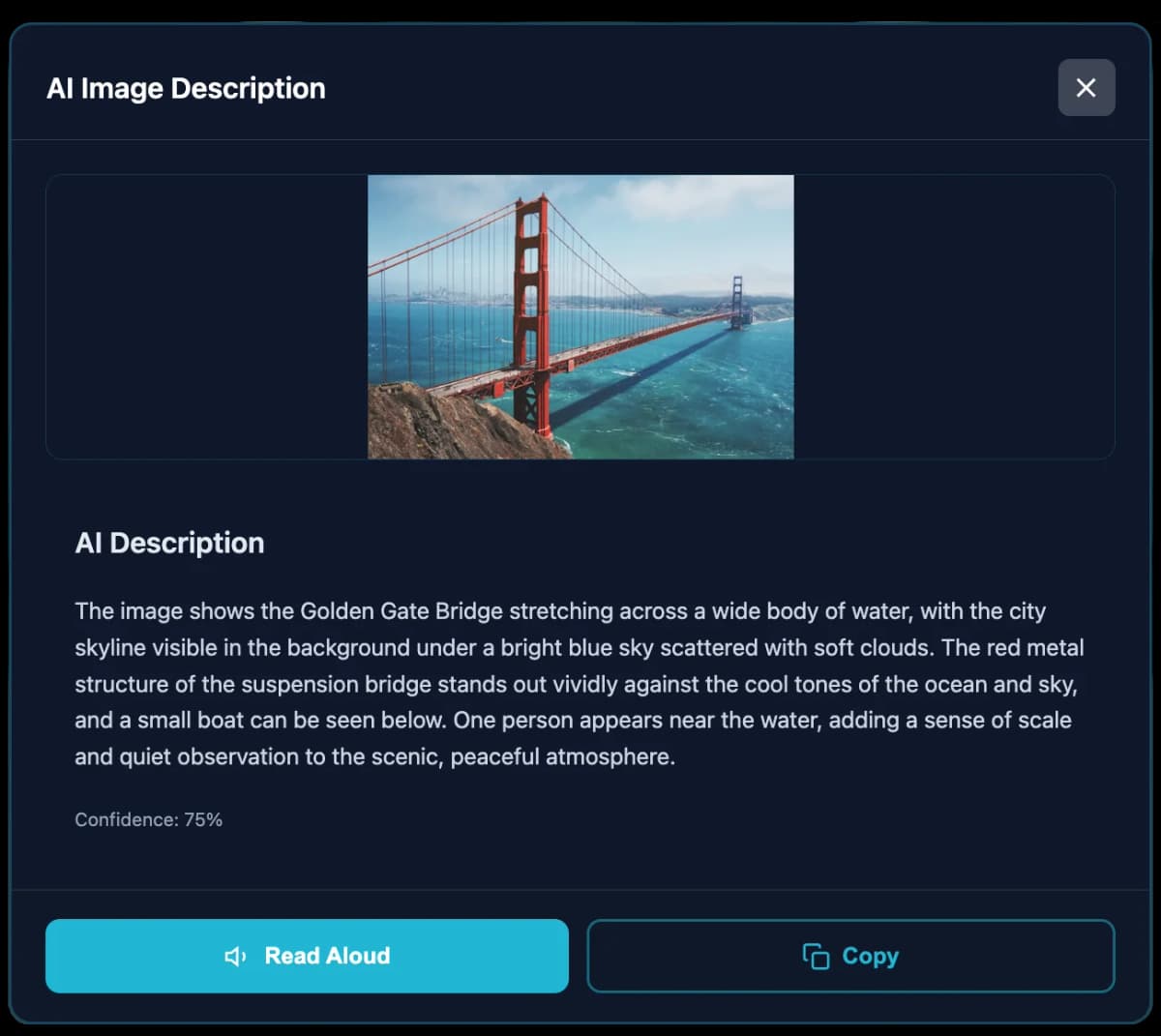
AXS Toolbar gives visitors practical choices at the point of need. They can simplify complex content, summarise long pages, translate information, listen to text, request image descriptions and adjust how they read and navigate.
Instead of waiting for someone to disclose a need, abandon a task or ask for help, the toolbar makes support available within the website experience itself.
AXS Toolbar improves the live user experience while the website evolves. For testing, evidence, prioritisation and remediation guidance, AXS Audit provides the compliance layer alongside it.
AXS Toolbar helps organisations make support available before visitors have to ask. It brings practical accessibility choices into the website experience from the moment someone arrives.
Support is built into the page experience, so visitors can adapt content around their needs without first having to disclose, explain or request help.
Created by neurodiversity and disability specialists, AXS Toolbar is grounded in real access barriers and real user behaviour, not assumptions.
The toolbar supports the person using the website. It improves usability, confidence and access without claiming to replace accessible design, testing or remediation.
Many accessibility widgets focus on how a page looks. AXS Toolbar also supports how people read, process, understand and act on information.
AI-powered tools help visitors reduce complexity, understand dense content and make sense of information without leaving the page.
Visitors can use text-to-speech, translate content and request image descriptions where written language or visual content creates a barrier.
No false compliance promises. No claim that one line of code can fix a website. AXS Toolbar supports users while AXS Audit supports testing, evidence and remediation.
AXS Toolbar is designed to be easy to deploy, simple to manage and flexible enough to sit inside a wider accessibility strategy.
A lightweight website accessibility widget that can be added without rebuilding the site or disrupting the existing user journey.
Adapt the toolbar to your brand, choose which features are available and shape the experience around the needs of your visitors.
Use AXS Toolbar to support users in the live experience. Use AXS Audit to identify barriers, evidence progress and guide remediation.
23 powerful accessibility features organised into intuitive categories, with AI-powered tools that adapt to individual needs
AXS Toolbar is not a one-size-fits-all accessibility widget. It can be shaped around your brand, your users and the way your website works.
Choose toolbar colours, add your logo and set the icon style so the toolbar feels part of your website.
Activate the tools your users need, from Simplify, Summarise and text-to-speech to translation, voice navigation and image descriptions.
Support 40+ languages and choose which are available to visitors.
Protect brand names, product names, technical phrases and other important words from being translated or simplified incorrectly.
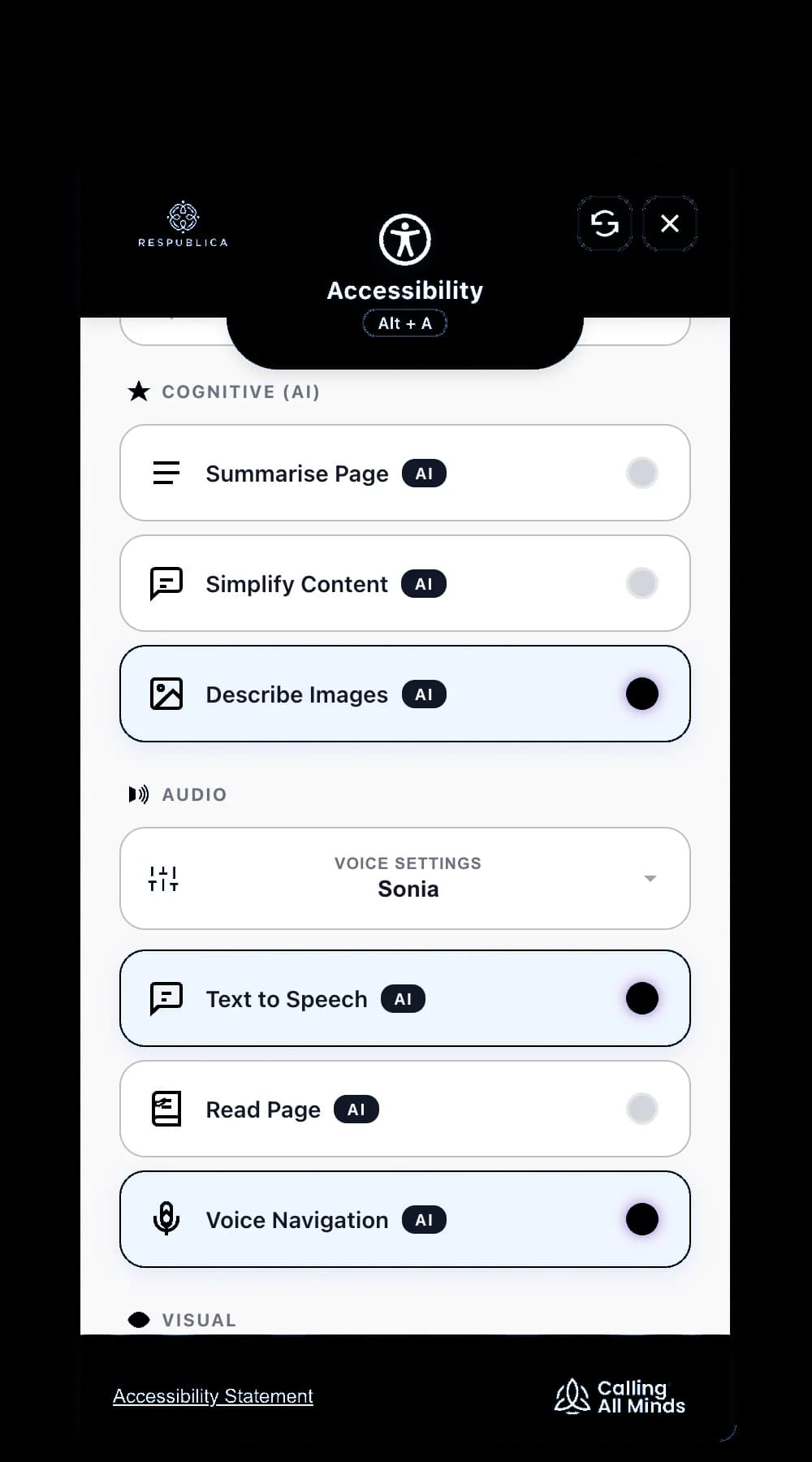
AXS Toolbar uses advanced cognitive AI where it can reduce friction in the moment. Visitors can summarise long pages, simplify complex language, describe images, use voice interaction and translate content into 40+ languages.
The aim is not to replace accessible design. It is to give people practical choices while they read, listen, understand and navigate.
Turn long pages into shorter, easier-to-process summaries.
Rewrite complex language into clearer, more direct wording.
Translate page content into 40+ languages using LLM-powered language support.
Generate image descriptions that help visitors understand visual content.
Let visitors listen to content using clearer, more natural voice options.
Voice-led interaction for visitors who prefer to speak rather than click or type.
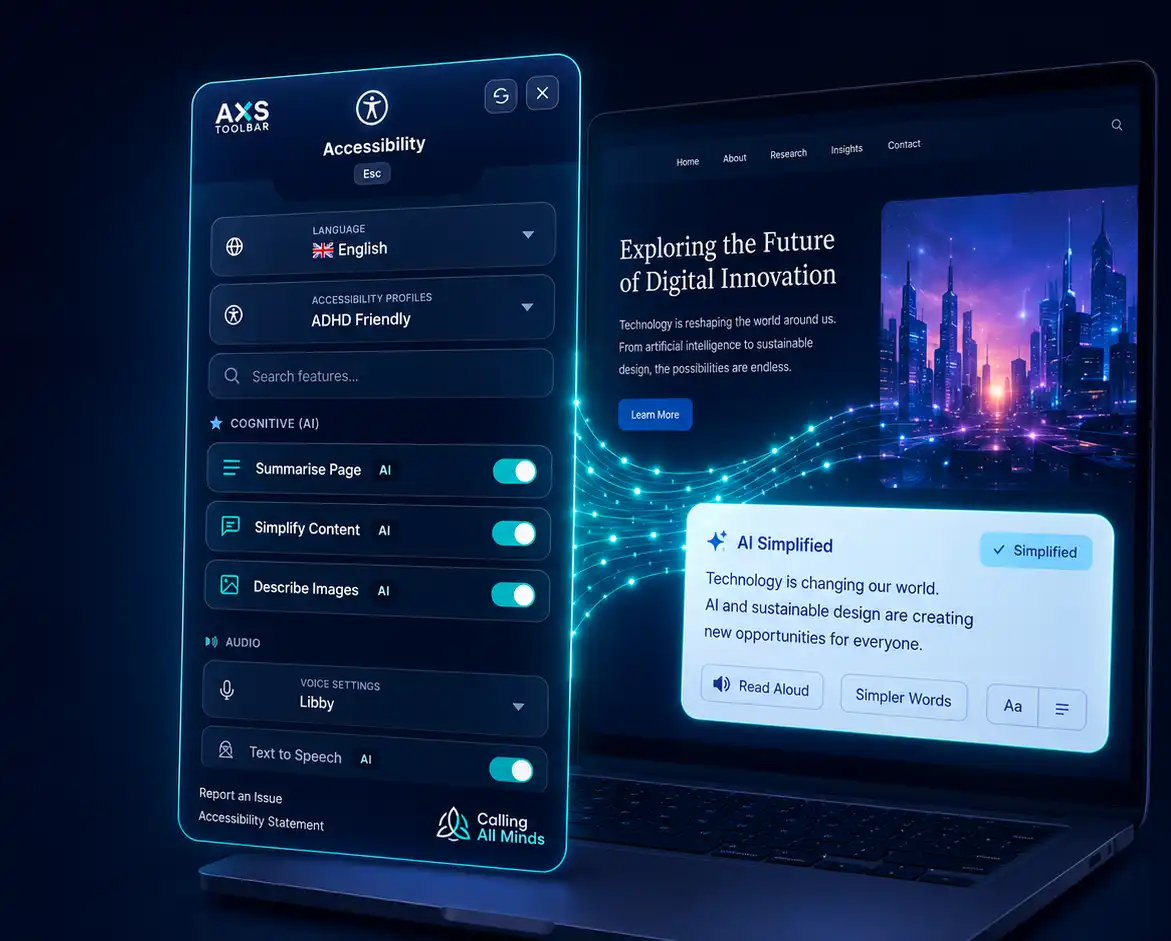
Built for live support
Cognitive AI features sit inside the toolbar experience, giving visitors support at the point they are reading, listening or navigating.
The best way to understand AXS Toolbar is to use it. Open the toolbar and try Simplify, Summarise, text-to-speech, translation, image description and voice navigation support on the content you are reading now.
This is what experience enhancement feels like: practical support available in the moment, without waiting for someone to ask.

Around 1.3 billion people globally experience significant disability, while one recent analysis of the top one million homepages reported that only 4.1% were fully accessible. WCAG standards matter because they create a baseline for web accessibility, but inclusive website experiences should go further.
People do not experience websites as checklists. They experience forms, journeys, content, choices and moments of pressure. A website can meet technical requirements and still feel difficult, confusing or exhausting for many visitors.
AXS Toolbar is designed for that gap. It enhances the live user experience by giving visitors practical tools to simplify, summarise, read, translate and navigate content in ways that work for them.
Create the baseline
WCAG, legal duties and accessibility regulations help organisations understand what accessible digital services should provide. They are essential, but they are not the whole experience.
Improves the website
AXS Audit helps teams identify barriers, evidence progress, prioritise fixes and guide remediation, supporting the deeper work of improving the underlying website over time.
Enhances the experience
AXS Toolbar supports people using the website. It gives visitors practical tools to adapt the live experience around their own needs, preferences and ways of processing information.
Accessibility standards and legal duties matter. The right approach is to understand them clearly, then go beyond minimum compliance to create better user experiences.
Web accessibility benchmark
WCAG 2.2 Level AA is the widely recognised benchmark for accessible digital content. AXS Toolbar supports users in the live experience with reading, cognitive, language and navigation tools. For testing, evidence and remediation, use AXS Audit alongside our WCAG guidance.
Reasonable adjustments and inclusive access
In the UK, organisations have duties to make reasonable adjustments and avoid placing disabled people at a substantial disadvantage. AXS Toolbar helps create a more supportive website experience, while AXS Audit helps teams identify and evidence barriers that need to be fixed.
AXS Toolbar does not auto-remediate, rewrite or interfere with your website code. It supports people using the site. AXS Audit supports the work of finding, evidencing and fixing accessibility barriers.
Connected accessibility support
AXS Toolbar enhances the live user experience. Lasting accessibility also depends on clear standards, testing, remediation and governance. Explore the AXS products and guidance that help organisations support users now and improve accessibility over time.
Learn when accessibility toolbars help, how cognitive tools support users and why accessible websites still need good design, testing and content.
Learn moreIdentify accessibility barriers, evidence progress, prioritise fixes and guide remediation across your website.
Learn moreManage workplace adjustments and accommodations so people can access the support they need across work, learning and everyday systems.
Learn moreUnderstand EAA expectations for accessible digital products and services.
Learn moreExplore reasonable adjustments and UK disability inclusion duties.
Learn moreLearn how clarity, cognitive load and comprehension affect digital access.
Learn moreReview practical WCAG criteria and accessibility requirements.
Learn moreTry AXS Toolbar on this page, then explore how it could support visitors across your own website.

Developed by Calling All Minds - Leading inclusion specialists
Everything you need to know about AXS Toolbar, website accessibility widgets, cognitive accessibility and how the toolbar fits alongside AXS Audit.
An accessibility toolbar is a set of tools that helps visitors adapt how they experience a website. It may include features such as text size controls, contrast settings, reading support, text-to-speech, translation, navigation help and other personalisation options.
AXS Toolbar goes further by adding cognitive AI tools that help visitors simplify, summarise, understand and navigate digital content more easily.
Yes. AXS Toolbar can be described as a website accessibility widget because it sits on a website and gives visitors access to support tools. We call it a toolbar because it is designed as a clear, user-controlled set of features rather than a hidden promise that a website has been automatically fixed.
AXS Toolbar helps visitors simplify complex content, summarise long pages, read more comfortably, translate information, use text-to-speech, request image descriptions, navigate by voice and personalise the way they interact with a website.
It is designed to support different needs, including reading differences, cognitive overload, visual stress, fatigue, attention differences, language barriers and different ways of processing information.
No accessibility toolbar or widget should be treated as a complete route to WCAG compliance. WCAG conformance depends on the underlying design, content, code, structure, testing and remediation of the website.
AXS Toolbar supports the live user experience. AXS Audit supports the work of testing, evidencing, prioritising and remediating accessibility barriers.
No. AXS Toolbar does not auto-remediate, rewrite or interfere with your website code. It gives visitors practical tools to adapt their experience of the live website.
That distinction matters. The toolbar supports people using the site, while AXS Audit supports the organisation responsible for improving the underlying accessibility of the site.
Many accessibility overlays are marketed as automatic compliance solutions. AXS Toolbar is different. It does not claim to fix a website by adding one line of code or by masking accessibility issues.
AXS Toolbar is an experience enhancement layer. It gives users practical control over reading, understanding, translation, navigation and personalisation while organisations continue the deeper work of accessible design, testing and remediation.
AXS Toolbar supports the person using the website. It helps visitors adapt the live experience around their needs.
AXS Audit supports the team responsible for improving the website. It helps identify accessibility barriers, evidence progress, prioritise fixes and guide remediation.
Used together, they help organisations support users now and improve accessibility over time.
Yes. Organisations can configure the toolbar so it feels part of their website. You can choose colours, add your logo, set the toolbar icon style and position, decide which features are active and control which languages are available to users.
You can also protect important words and phrases, such as brand names, product names, technical terms or sector-specific language, so they are not translated or simplified incorrectly.
AXS Toolbar currently supports 40+ languages. Organisations can choose which languages are available to visitors, helping people access content more easily when English is not their first language or when they prefer to read in another language.
Yes. AXS Toolbar can protect selected words and phrases from being translated or simplified. This is useful for brand names, product names, technical terminology, legal phrases, medical terms, acronyms and other language that must remain accurate.
AXS Toolbar is designed to support accessibility without getting in the way of existing assistive technologies. It should enhance the user experience rather than interfere with screen readers, keyboard navigation or native browser accessibility features.
As with any accessibility technology, organisations should continue to test their website with real users, assistive technologies and accessibility audits.
AXS Toolbar is designed for anyone who may benefit from more control over how they use a website. This may include disabled people, neurodivergent people, people with dyslexia, ADHD, autism, visual stress, cognitive fatigue, low literacy, English as an additional language or temporary access needs.
It also helps people who are tired, distracted, under pressure or trying to complete complex tasks online.
No. AXS Toolbar is built with disability and neurodiversity in mind, but the benefits are wider. Many people need support at different times depending on context, environment, device, stress, fatigue or language.
That is the point of inclusive design: better access for those who need it most, better experiences for everyone.
AXS Toolbar should sit alongside accessible design, good content, technical accessibility, user testing, WCAG audits and ongoing governance. It is not a replacement for that work.
It is the user-facing layer that helps visitors adapt the experience while your organisation continues to improve the website itself.